Dashboard and Metrics
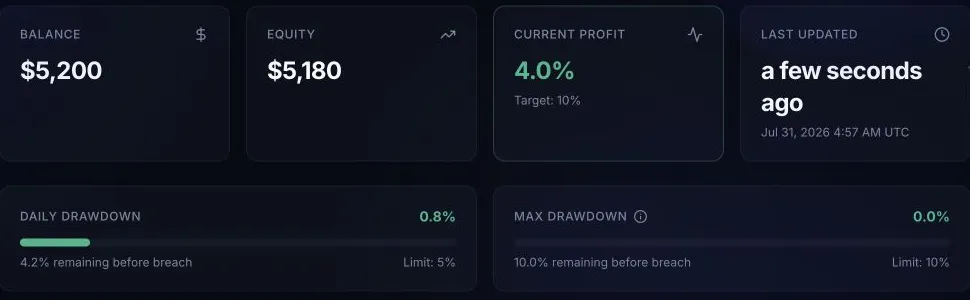
Read balance, equity, profit, drawdown, trading days, phase, status, and update time.
Use MT5 for immediate trade execution and the BFT dashboard for program progress. Always check the dashboard update time before treating a metric as current.
Before you start
Select the intended account when you have more than one. Confirm the program, phase, status, and account number before interpreting a chart or gauge.
How it works
- Balance: Closed trading result and account adjustments.
- Equity: Balance plus floating profit or loss.
- Profit: Progress toward the current evaluation target; funded accounts have no evaluation target.
- Profit Progress chart: Daily synchronized profit snapshots, ending with the latest current profit. The chart is not calculated by adding the visible Trade History rows.
- Daily Drawdown: Loss used for the current dashboard day, including equity effects.
- Maximum Drawdown: Overall loss measured against the initial simulated balance.
- Trading Days: Qualifying days recorded for the current phase. Each day follows the trading provider's daily rollover, not UTC midnight.
- Trade History: Closed trades synchronized to BFT.
- Phase and Status: The current stage and whether it is active, completed, funded, or breached.
- Update time: When BFT last synchronized account data.
The daily reset card includes a countdown. Use it instead of converting a fixed clock time across time zones.
What success looks like
Confirm that the selected account matches MT5 and that the update time is recent. The balance, equity, and closed history should reconcile with the trading platform. During evaluation, both the profit card and the trading-day card show progress toward the current phase.
Common mistakes
- Reading another account's metrics after switching phases.
- Comparing current MT5 equity with an older dashboard timestamp.
- Treating balance as the loss-limit input while open positions reduce equity.
- Assuming the daily countdown is a payout countdown.
What happens next
Continue trading only when the dashboard confirms adequate loss-limit headroom. When all passing conditions are met, read Passing and account progression.